Your cameras tell you what happened. Tendline tells you what didn’t.

Say what should happen and by when. The dog walker between 12 and 2. Mom’s front door by 11. The garage shut at 10. Tendline checks your cameras at the right moments, gives you a heads-up when something didn’t happen, and says plainly when it couldn’t see.

Free for one home and three routines, with a heads-up if a camera goes offline or too dark. Ring support is in development through Ring’s official partner program. With early access, any camera works by uploading a clip or photo.

Thursday, 5 November Home and Mom’s house, 6 AM to midnight As of 10:41 PM

HomeAlder Lane, 3 cameras

Mom’s houseBirch Street, 1 camera

  • When it should happen
  • Happened
  • Didn’t happen
  • Needs a look
  • Couldn’t confirm
  • Couldn’t see
  • Scheduled look

Home Alder Lane

  1. Bins at the curb at the 7:00 check.
  2. Didn’t happen: No dog walker seen 12 to 2. The cameras could see the whole window, so you got a heads-up.
  3. UPS left a package.
  4. Kids home, ahead of the 4:00 deadline. The package went in with them.
  5. Needs a look: Garage open at the 10:00 check. Looking again every 30 minutes.
  6. Garage closed at the re-check.

Mom’s house Birch Street

  1. Couldn’t see: Porch camera offline until 11:40 AM.
  2. Couldn’t confirm: “Front door by 11” couldn’t be confirmed, because the camera was offline. Not reported as missed.
  3. Front door opened.
  4. A visitor, 2:05 to 3:20 PM (1 h 15 min).
  5. Needs a look: A package left at 6:12 PM is still on the porch after 2 hours.

When someone’s around at 2 AM, you get the whole story.

Your cameras already notice motion. Watch reads each event as several frames, follows the person from camera to camera, and tells you plainly what it saw: a covered face, something in hand, a hand on a door handle. One tap says Seen. One tap says That’s us.

A Watch incident in the Tendline app: Look now, someone with their face covered at the Driveway at 2:04 AM, now at the Garage with a hand on a door handle at 2:09 AM. A path from Driveway to Front Door to Garage, the signals seen, the camera's reading, and buttons for Seen, That's us and Call 911. Beside it, the same alert on a phone lock screen.
From the demo home: Tendline’s real engine over a made-up night. Drawings stand in for camera frames.

Several frames, not one

Each event is read as three pictures a couple of seconds apart, so it sees what someone did, not one frozen moment.

Camera to camera

Sightings minutes apart become one incident with a path: driveway, front door, garage. Updates replace the notification instead of piling up.

Quiet when it’s you

Bins at midnight, a winter scarf, the courier at 9 PM: nothing. And if it was you after all, That’s us pauses Watch for 30 minutes.

See it in the demo homeAn add-on to any plan, $19.99 a month. It describes what the cameras show and never identifies anyone.

One tap: is everything OK at home?

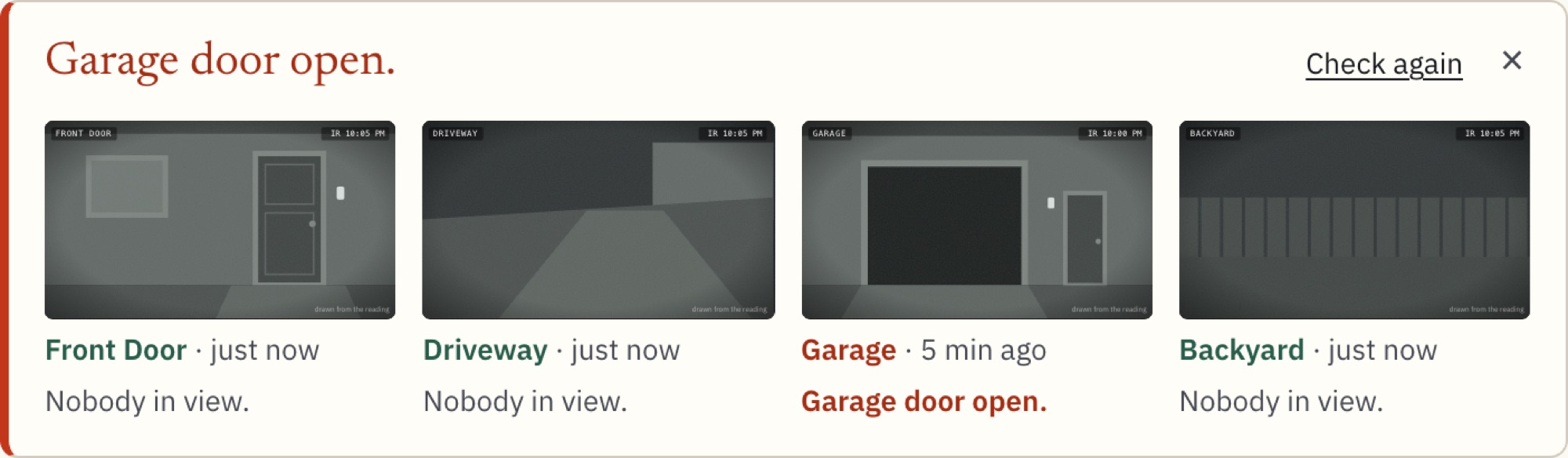
Check now looks at every camera at once and answers in one line: who’s in view, what’s open, what couldn’t be seen. No scrubbing through clips, no opening four live views one by one.

Check now in the Tendline app: Garage door open. Four camera frames: Front Door, nobody in view; Driveway, nobody in view; Garage, garage door open; Backyard, nobody in view.

Say it the way you’d say it to a neighbor.

A routine is one sentence. Tendline works out the camera, the window and the check, and shows you what it understood before anything runs.

  1. “Tell me if Mom’s front door hasn’t opened by 11.”

    By a timeMom’s porch camera, every day, until 11:00 AM

  2. “Dog walker between 12 and 2 on weekdays.”

    In a windowFront and side cameras, Monday to Friday, 12:00 to 2:00 PM

  3. “At 10 PM, make sure the garage is closed. Keep checking every 30 minutes.”

    Look-checkGarage camera, every night at 10:00 PM, then every 30 minutes until it’s closed

  4. “Tell me if a package sits outside more than 2 hours.”

    Too longFront camera, any day, 2-hour limit from drop-off

  5. “Kids home by 4.”

    By a timeFront camera, school days, 2:30 to 4:00 PM

  6. “Bins at the curb by Thursday 7 AM.”

    Look-checkFront camera, Thursdays at 7:00 AM

Try the routine builderType a sentence and see how Tendline reads it. Or drop a clip from any camera and see what changed.

A heads-up that says what it checked.

When an expected thing doesn’t happen, you get one short message: what was expected, what was seen, and whether the cameras could actually see.

Tendline only calls something missed when the cameras were online and readable. If a camera was offline, the frame too dark, or there was no fresh image, it says couldn’t confirm and tells you why. It never fills a gap with a guess.

  • Didn’t happen. The cameras could see, and it wasn’t there.
  • Couldn’t confirm. The cameras couldn’t see enough to say. You get the reason.
  • Needs a look. Something is in the wrong state, or has been there too long.

2:01

Thursday, 5 November

Tendline · Home

Dog walker not seen

No one was seen at the front or side door between 12:00 and 2:00 PM.

Both cameras could see the whole window.

Tendline · Mom’s house

Couldn’t confirm: front door by 11

The porch camera has been offline since 10:12 AM, so there’s no way to tell if the door opened.

Not counted as missed.

Two messages from the same Thursday. The first is a real miss. The second is honest about a gap.

One brief at 7 every morning, across every place.

Your home, a parent’s home, a rental, a shop: one short read with four parts, in the same order every day.

  • Needs a look. Packages still out, a door in the wrong state, a deadline that couldn’t be confirmed.
  • Didn’t happen. Expected things that weren’t seen while the cameras could see.
  • Happened. Deliveries by carrier and time, visits with how long they lasted, routines that were met.
  • Couldn’t see. Which camera, when, and what that meant.

The brief is built from what was recorded. It doesn’t make anything up overnight.

Morning brief

Friday, 6 November

Yesterday at 2 places, 4 cameras. Sent 7:00 AM.

Needs a look 1

  • Mom’s house. A package has been on the porch since 6:12 PM. Not seen brought in.

Didn’t happen 1

  • Home. No dog walker seen. The front and side cameras could see the whole window.

Happened 6

  • Home. Bins at the curb at the 7:00 check.
  • Mom’s house. Front door opened.
  • Mom’s house. A visitor, 2:05 to 3:20 PM (1 h 15 min).
  • Home. UPS left a package. Brought in at 3:38 PM.
  • Home. Kids home, ahead of the 4:00 deadline.
  • Home. Garage was open at the 10:00 check, closed by the 10:30 re-check.

Couldn’t see 1

  • Mom’s house. Porch camera offline 10:12 to 11:40 AM, so “front door by 11” couldn’t be confirmed.

Every new routine starts with a practice week.

For its first seven days a routine runs silently and keeps a list of what it would have sent. You switch on the alerts that earn their place, and fix the ones that would have nagged.

Practice week, day 5 of 7

“Tell me if a package sits outside more than 2 hours.”

Front camera · every day · 2-hour limit

Would have sent 3 alerts in 5 days. Nothing was sent: this is practice.

  1. SunWould have sent 1:20 PM. Left 11:20 AM, in at 2:05 PM.
  2. MonWould have sent 5:30 PM. Second package, left 3:30 PM.
  3. TueWould have sent 12:15 PM. Out until 4:50 PM.
  4. WedNo packages.
  5. ThuIn after 1 h 12 min. Nothing to send.
  6. FriStill practicing.
  7. SatStill practicing.
Each row is one day, 6 AM to midnight. The red part of a bar is the time after the limit.

Works with the cameras you have.

Camera support
CameraHowStatus
RingRing’s official partner programIn development
Any cameraUpload a clip or photoAny brand
Home Assistant, Frigate, Blue Iris, ScryptedA push URLSupported
UniFi ProtectDirect connectionPlanned

Every camera, honestly

Already pay for Ring Pro? Keep it.

Ring describes each event as it happens. Tendline holds your expectations: what should happen, by when, and what didn’t. They do different jobs, side by side.

Tendline and Ring Pro

Tendline is not affiliated with or endorsed by Ring LLC or Amazon.

What it will never do.

These aren’t settings. They’re how Tendline is built.

No faces, no names

It describes roles and objects: “a courier in a brown uniform”, “a van”. It never recognizes or matches anyone.

No audio, no verdicts

It never listens. It never calls anyone an intruder or a thief; it says what it saw, and “can’t tell” when it can’t.

Not an alarm

Tendline sends heads-ups and briefs. It doesn’t call anyone or send help. In an emergency, call 911.

Read the principles

Join the early list

Tendline isn’t open yet. Leave your email and tell us what you’d use it for. We’ll write when there’s something you can try, and we won’t use your address for anything else.

The free plan will stay free. Joining the list costs nothing and commits you to nothing.

What would you use it for?
Which cameras?

If the button doesn’t respond, email admin1@sovnode.ai with “early list” in the subject and we’ll add you.